
Architecture and Security at SFDevTools
Last Updated: August 2026 (v1.23.0)
SFDevTools provides deep access to your Salesforce metadata, which means we operate with an absolute commitment to security and transparency. We engineered our stack to be fundamentally ephemeral where possible, limiting our surface area and prioritizing zero-trust principles.
The SFDevTools Stack
SFDevTools runs on four core infrastructure components. All connections are secured over TLS.
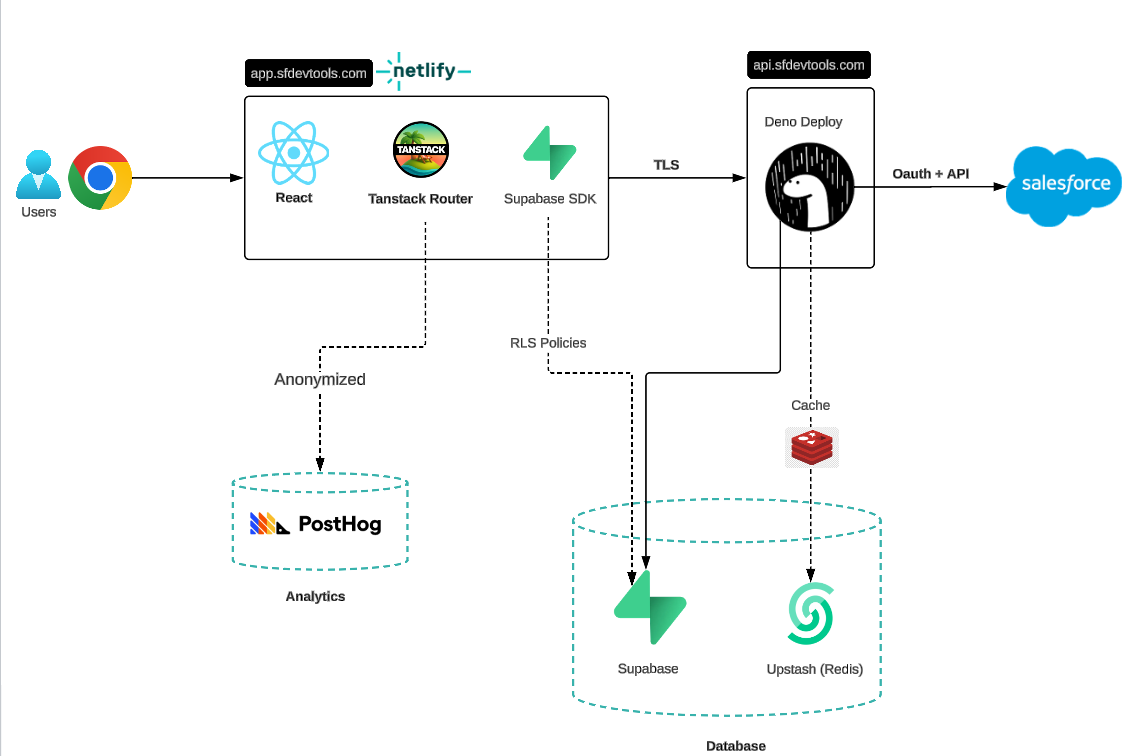
Component Roles
| Component | Host | Role |
|---|---|---|
| Frontend | Cloudflare Pages | Static React app. No customer data stored by default. |
| Backend API | Railway | Containerized Bun/Hono service. All Salesforce API calls are proxied here. |
| Database | Railway | Self-managed PostgreSQL 16 — stores accounts, encrypted tokens, preferences, and optional query history. |
| Cache | Railway | Self-managed Redis 8 — optional, user-controlled ephemeral cache. Never persists data beyond TTL. |
| Analytics | PostHog | Fully anonymous product analytics, including masked session replay. |
| Error Tracking | Sentry | Backend error tracking, scrubbed of tokens/cookies/bodies before recording. |
Data Flow
1. Authentication The frontend uses Better Auth (magic link and Google OAuth) for user sign-in. On success, a session token is issued and attached to every backend request, which the backend validates on each call.
2. Connecting a Salesforce Org
When connecting an org, you control the level of access by selecting your connection type:
- Session Only: Requests limited scopes (
api web) from Salesforce. We receive a temporary access token that is destroyed the moment you log out. No refresh token is ever requested or stored. - Persistent: Requests extended scopes (
refresh_token offline_access) to keep you logged in across sessions. The resulting access and refresh tokens are encrypted usingAES-256-GCMand stored securely in our database.
The plaintext token never leaves the backend process that encrypted it.
3. Using a Tool Every tool action flows: Browser → Backend API → Salesforce. The backend decrypts your token in-memory for the duration of that request, proxies the API call to Salesforce, and returns the result. To reduce Salesforce API load, you can opt into caching specific results (like describes) in our Redis cache. Your actual Salesforce data is never written to our database.
4. Persistent User Data A small set of user-generated data (preferences, connections, and optionally your query/Apex history) is stored in our database. Application-level tenant isolation ensures your records are strictly scoped to your account and team — other users cannot access your data.
5. Using the AI Agent
The optional AI Agent chat feature gives you a conversational interface to your connected Salesforce org data. When you send a message, your prompt and any tool results the agent retrieves on your behalf (e.g. query results, schema, permissions) are sent to the model provider you select — Anthropic (Claude) or Google (Gemini) — to generate a response. Workspace owners may optionally supply their own Anthropic and/or Google API key (Bring Your Own Key) so agent turns run on that key instead of the shared platform credit balance, which is paused (not drawn down) while BYOK is active. Supplied keys are encrypted (AES-256-GCM, under a dedicated encryption key separate from Salesforce token encryption) and are write-only — never returned or displayed again once saved, only replaced. The agent's data access is read-only by default. It can additionally run anonymous Apex, create, update, or delete individual records, or apply field- and object-permission changes — each such action requires your explicit approval on an in-chat approval card before anything executes (updates show a before→after diff; production orgs carry a warning), and every executed action is written to your Activity Ledger. For questions that span more than one connected org, the agent can delegate org-specific lookups to focused sub-agents and combine their answers — only the sub-agent's final answer is passed back into the conversation, not the raw data it retrieved. Conversations (threads and messages) are stored in our database, scoped to your account and org, so you can resume them later; you can delete a conversation at any time. AI usage is tracked against a shared, per-team credit balance rather than a per-user daily cap. The agent can also produce Artifacts — self-contained HTML deliverables saved to your conversation in our database; re-opening an artifact does not call the AI.
6. Analytics, Session Replay, and Error Tracking
Product analytics (PostHog) are fully anonymous — no identify() calls, no person profiles, no PII. Session replay is enabled to help us diagnose issues, but all rendered text is masked by default (maskAllInputs + a catch-all text mask) — only layout, clicks, and navigation are captured, never your query results, SOQL, or Salesforce record data. Analytics requests route through a same-origin reverse proxy (for ad-blocker reliability), which strips cookie and auth headers before forwarding. Separately, backend errors are sent to Sentry for error tracking; a deny-by-default scrubber strips tokens, cookies, request bodies, and SOQL from every event before it is recorded, and only error metadata (path, status, org/tenant identifiers) is retained. Sentry is not used for tracing or performance monitoring today — errors only.
7. Using AI Dashboards The optional AI Dashboards feature lets you describe a dashboard in plain language. A builder agent (powered by Anthropic or Google) authors a structured layout with typed field bindings — it does not compose free-form SOQL. The frontend constructs safe queries from those structured bindings and runs them against your org under your own credentials. Once a dashboard exists, viewing it re-queries Salesforce directly without any AI involvement. Dashboard specs, field bindings, version snapshots, and associated builder conversation history are stored in our database scoped to your team, and can be deleted at any time.
How We Handle Your Data
The underlying philosophy behind SFDevTools is that your data is yours. We only persist the information technically required to make our multi-org tools functional, and we give you control over where your data lives.
1. Identity and Access
We do not ask for or store your Salesforce passwords. All authentication relies on native Salesforce OAuth 2.0. Our backend receives OAuth tokens, which are deeply encrypted using AES-256-GCM. Decryption occurs dynamically in-memory exclusively when an active session requires it to proxy a request.
2. The Scope of Our Access
When you connect an org, SFDevTools inherits your exact permission boundaries. We cannot bypass your Salesforce profile restrictions. If your user cannot query an object or run Apex in Salesforce, you cannot do so via SFDevTools.
3. Ephemeral Operations and User-Controlled Caching
Salesforce API calls can be slow. To improve performance, we use a self-managed Redis cache to reduce round-trips. You are in control of this cache.
By default, caching is toggled ON for SObject describes and global describes. If you turn this setting off, all requests route directly to Salesforce. Cached entries are keyed per-user and per-org - you will never share a cache state with another user.
| What can be cached | TTL | Notes |
|---|---|---|
| SObject describe (single object) | 1 hour | Compressed (Gzip) |
| SObject global describe (full list) | 1 hour | Compressed (Gzip) |
| Entity/Field definitions query results | 1 hour | Compressed (Gzip) |
| Salesforce access tokens | 90 minutes | Encrypted (AES-256-GCM) |
Note: All cache entries have a hard expiry. On account deletion, all Redis keys belonging to your user are explicitly purged before database records are removed.
4. What We Do Persist (and What You Control)
To provide a seamless experience, we store a well-defined set of data in our database.
Your Execution History is up to you: You can choose whether to save your SOQL queries and Apex execute snippets to our database (for cross-device access) or toggle this feature off. If turned off, your queries and scripts are stored strictly in your browser's Local Storage and never touch our servers.
For data saved to our database, we store:
- User Profiles: Name, timezone, and default org preferences.
- Salesforce Connections: Org details, aliases, connection type (Persistent vs Session), and encrypted OAuth tokens (only if Persistent is selected).
- Execution History (Optional): SOQL queries, Apex scripts, and SOSL searches you have explicitly opted to sync.
- Dashboard Preferences: Which objects are pinned and their display order.
- Data Import Logs: Metadata about bulk jobs (object name, operation, record counts, status/errors).
- Activity Ledger: An immutable, system-managed log of all mutating Salesforce operations you perform via SFDevTools (Data Porter imports, Apex Executor runs, SwitchBoard automation toggles, Permissions Matrix applies, Record Inspect edits, and approved AI Agent actions). Entries record the org, operation type, and outcome counts — never your Salesforce record payloads. Retained for 90 days and then automatically purged.
- AI Agent Conversations (Optional): If you use the AI Agent, your conversation threads and messages are stored in our database so you can resume them later. We also track aggregate token usage per request (model used, token counts, tool calls) to maintain your team's shared AI credit balance. Deleting a conversation removes its messages and any associated Artifacts.
- AI Provider Keys (Optional, Bring Your Own Key): If a workspace owner supplies their own Anthropic and/or Google API key, it is encrypted (
AES-256-GCM) and stored in our database, scoped to your team. We never display a saved key again after it is entered — it can only be replaced. We separately record which billing mode (platform or your own key) a workspace is using and when it changed. - AI Artifacts (Optional): HTML deliverables the agent produces during a conversation are saved to our database (one per conversation thread) so they can be reopened later. Artifacts are removed when their parent conversation is deleted.
- AI Dashboards (Optional): If you use AI Dashboards, the dashboard layout, field bindings, and version history are stored in our database scoped to your team. Builder conversation history (the exchange with the AI that produced the dashboard) is also stored. Dashboards and their history can be deleted at any time.
Your Salesforce records and field data are never written to our database.
5. Data Removal
- Automated Session Cleanup: If you connect to an org using a "Session Only" connection, logging out of SFDevTools automatically purges that connection and immediately busts all associated cache keys.
- Per-item deletion: Query history, dashboard tiles, and import logs can be deleted individually from within the app at any time.
- Account deletion: SFDevTools provides a self-serve account deletion option in your profile settings.
Triggering account deletion is immediate and irreversible. It will:
- Purge all Redis cache entries for your user and connected orgs.
- Delete your account from our Auth provider.
- Cascade automatically through the database, permanently removing your profile, synced query history, dashboard preferences, import job logs, Activity Ledger entries, AI Agent conversations, AI Artifacts, AI Dashboards (including version history and builder conversations), and session state.
Sub-Processors Overview
SFDevTools relies on industry-leading platforms to ensure stability and security. For a complete, up-to-date breakdown of the vendors we use to process requests, please refer to our dedicated Sub-Processors List.